
Alerts
Three kinds of alert reach you on Chain Daddy, and you choose where each one lands:
- Community alerts, from a creator to the members of their community. Hold $1+ of a coin and join its community from its coin page: For holders. A creator sends them with Alert Holders: Community Alerts.
- Market alerts on a coin: milestones, big price moves, pulled liquidity, and for its owner, whale buys and buy streaks. Market alerts
- Health alerts about your own coin: its health score, copycats and offers. Your coin's health
Where to find them
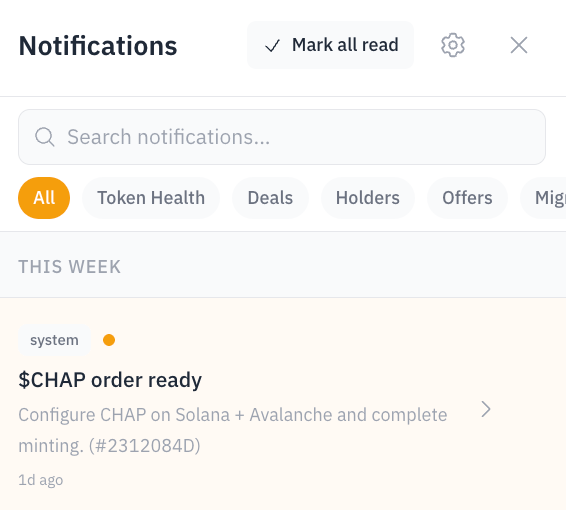
Every alert lands in your inbox: the bell at the top of Chain Daddy, with the unread count on it. Press it to read, search and filter. Community Alerts shows only the alerts creators sent you, each labelled Community Alert or Urgent Alert, with a Leave button that leaves that community. The gear inside opens Preferences.
Turning on a channel
The in-app inbox is on for every alert. Coin At Risk, Coin Inactive and Listing Lost are on by default, so there is nothing to set up unless you want more or fewer.
- Sign in. Signing is free and moves nothing.
- Press the bell, then the gear. In Preferences, verify an email, add a phone for texts (SMS), or turn on push and choose Allow when your browser asks. Push is per device. On an iPhone it works only from the installed app.
- Set delivery under Delivery Settings: Quiet Hours, pause all emails, or one email digest a day.
- Choose channels per alert under Notification Types. For example, Coin At Risk by email, push and in-app, and Health Score in-app only.
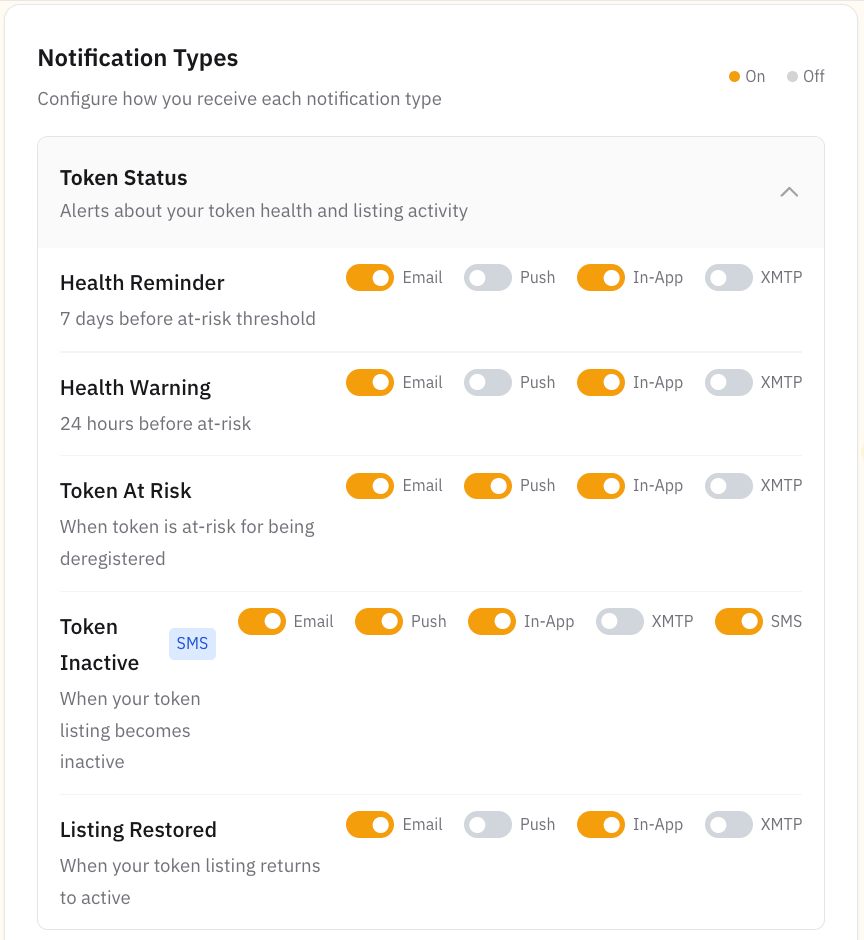
You should see each channel you added as a column you can switch on per alert. SMS is on by default only for Coin Inactive and Listing Lost. Webhooks, a post to your own service, need the Developer plan, which is in beta and free while it is, or Partner.
How often we text you
Alerts you chose texts for that have no text of their own, like a community's alerts and market alerts, come as one text from us: Chain Daddy Alert: you have new updates, with a link. Once your phone is verified, pick how often under Texts about new updates: Once a day (the default), Once a week, or Off. Alerts with a text of their own, like Coin Inactive, still come as they happen.
An app or a store never texts you its message. Switch on Text under Apps and its messages count toward the same text. It's off until you turn it on.
What each alert means
Your coin's health alerts
Your health score decides whether your registration stays active. How the score works
| Notification | What happened | What to do |
|---|---|---|
| Coin At Risk | Your score dropped into the 60–64 band | Lift volume or holder spread |
| Coin Inactive | Your score fell below 60. The 30-day countdown is running | Act now: 30 days below 60 and your coin's short name (its ticker) opens to others |
| Listing Restored | Your score is back at 65 or above | Nothing |
| Listing Lost | Another wallet registered your expired short name | See what happens when a registration expires |
Copycats, holders & offers
| Notification | What it means |
|---|---|
| Copycat Detected | Another coin took your short name, or one a letter or two off it. The notification links the copycat's address, and search flags it too. Every plan |
| Holder Milestone | You passed 10, 25, 50, 100, 250 or 500 holders, then 1K, 2.5K, 5K and on up to 1M. Every plan |
| New Holder / Holder Drop | A notable rise or fall in holders |
| Direct Purchase | Someone bought your coin through your coin page |
| Offer Received / Accepted / Declined | Movement on a deal for your coin |
Market alerts
| Notification | What happened |
|---|---|
| Market Milestone | Market cap crossed $10K, $25K, $50K, $100K, $250K, $500K, $1M, $5M, $10M, $50M or $100M, or set a new all-time high 5% above the last peak. Sent once each |
| Price Move | The price moved 20% or more, up or down, since the last check |
| Hour Move | The price moved 30% or more, up or down, over about an hour. At most once every 3 hours each way, and not again right after a Price Move the same way |
| Liquidity Pulled | Liquidity, the money in the pool that lets people buy and sell, fell by more than half. Sent during Quiet Hours too, and by email by default |
Market alerts go to every member of a coin's community, as many as each of them chose to get, and to its owner either way. Price Move and Hour Move reach only members on Everything. Coins under $10K market cap get no milestones or price moves, and a pool that held under $1K doesn't trigger Liquidity Pulled. A liquidity drop isn't always a rug pull: it can be a provider rebalancing a pool. Check on chain before acting.
Big buys on your coin
Only you hear these, as the coin's owner. Your members don't; your buy alert room does.
| Notification | What happened |
|---|---|
| Whale Buy | One buy that's big for your coin: 1% of its market cap, from $500 to $25,000 ($5,000 when its market cap isn't known). In-app and push, at most every 15 minutes |
| Buy Streak | 10 or more buys of your coin in 10 minutes. In-app, at most once an hour |
Coin migrations, for holders
A migration means a project is moving its holders to a new coin. You get Migration Started, Migration Deadline Soon and Migration Complete. Chain Daddy shows the terms; the swap happens through the project's own process. Confirm on the project's official channels, and never share your seed phrase, the secret words that unlock your wallet. What the notice means
For holders: join a community 🔔
Hold $1+ of a coin to join its community: a direct line from its creator to you. On its coin page, press Join and sign in. Approve a free signature to prove you hold it. Pick email, in-app, push, or a direct message on Telegram or Discord, and the creator's alerts reach you there. Pick SMS too and we text you at most once a day, with a link, when there's something new (how often). No feed, no ads, no public member list. Joining is free.
- $1 is the default bar, and a creator can set theirs higher. The join window shows the real one, such as Hold $5+ of PEPE to join. If you're short, a Buy button takes you to the amount that clears it. SMS needs $15 of the coin, or the creator's bar if higher.
- As a member you get the creator's alerts on the channels you picked, and anything they open to holders, such as holder links. The creator can see the wallet you joined with, and your email if you joined with one.
- To leave, open Your $PEPE alerts and press Leave $PEPE's community, or tap Leave on any of its Telegram or Discord messages or on one of its community alerts in your inbox. The Unsubscribe link in its emails stops only its emails, and you stay a member. To stop one kind of notification for every coin, switch its type off under Notification Types.
How many alerts you get from each community
Each community you join has its own setting, under Your $PEPE alerts. Open My Coins → Joined and press the gear on the coin's row, or the Your $PEPE alerts link in any email from that coin. Under How many alerts do you want from $PEPE?, pick one:
| Setting | What reaches you |
|---|---|
| Everything | Every alert from the team, plus every Price Move and Hour Move |
| Highlights (the default) | The team's alerts and the big moments, like a Market Milestone, plus everything under Big news only |
| Big news only | The team's urgent alerts, Liquidity Pulled, the coin page changing hands, and Migration notices. Nothing else |
Your channels stay as you set them. This only decides which messages come through them. Whatever you pick, we still tell you if a creator adds your wallet to their community.
Creator alert setup
To alert your own community, press Alert Holders in your coin manager: Community Alerts. For the alerts you get about your coin, choose channels per alert in Preferences. What you can turn on depends on your plan:
| Alert | What it watches | Plan |
|---|---|---|
| Health alerts, copycat detection, holder milestones | Your score nearing the at-risk line; coins taking your short name; your 10th, 100th, 1,000th holder | Every plan |
| Buy alerts | Buys of your coin, posted to your Discord or Telegram. From $10 on a coin launched with Chain Daddy, or your plan's smallest trade on one you verified | Every plan for coins launched with Chain Daddy. Buy alerts |
| Purchase tracking, price alerts | Buys through your page, a price level or move you set | Pro |
| Threshold rules | Holder drop, liquidity drop or unusual volume, set through the Alerts API and checked every 15 minutes | Pro |
| Holder concentration | The top ten holders' share of supply passing a percentage you set | Pro+ |
Forward alerts to Discord
Post your coin's market activity to your own Discord server through a webhook, a link that lets an app post into one channel. Every plan. Set it under Community → Market activity → Discord: paste a Discord webhook URL, then send a test post. Buy alerts use their own webhook, so a trade feed never lands in your announcements channel. Step by step: Discord.
Post to your Telegram group
Your coin's community room on Telegram gets the same market activity. A group added with Add to your Telegram group is your community room already, so there is nothing to set up.