
Liquidity
Launched your coin with Launch a coin? Skip this page
Its pool was created with the coin, and the money in it can't be withdrawn, so there is nothing to add, lock or open. This page is for a plain coin, or any pool you fund and run yourself.
Liquidity is the money in the pool that lets people buy and sell your coin. You put some of your coins and some ETH or SOL into a pool (the market where your coin trades), and every buyer and seller trades against it. No pool, no trading.
What you put in sets your opening price (the ratio between the two sides) and how much the price moves with each trade: a bigger pool moves less.
Going live, in order:
- Add liquidity from your own wallet, right after mint or later.
- Lock or burn your LP tokens (your receipt for the pool) so traders can see you can't pull the money out. Your choices
- Open trading (EVM chains only). Until you do, nobody can buy or sell. How
On EVM chains, a pool alone doesn't make your coin tradable
A coin made on Chain Daddy on an EVM chain (Ethereum, Base, and chains like them) starts with trading switched off, so you can fill the pool before bots can buy. You switch it on yourself, after the pool is funded. Solana coins have no switch: they trade as soon as the pool exists.
Paying by wallet? It can all happen in one transaction
If you check out with an EVM wallet, the Make it Tradeable step fills the pool, optionally locks your LP tokens, and opens trading in the same transaction that creates your coin. Card and PayPal orders create the coin first; you then fill the pool and open trading as separate steps.
Do you need it now?
Not yet, if you don't want trading yet: your coin page and holder tools work without a pool. For trading from day one, add liquidity right after mint, then open trading (EVM).
How much can you add?
You enter amounts in whole coins, up to what your wallet holds. The app checks your balances before you sign. If you see "you're adding X but this wallet holds Y", lower the amount.
Add liquidity
Right after mint
When your coin is created, the full supply goes to your wallet. The launch checklist's Add liquidity now → button then opens Create Pair, the same form as your coin manager's Liquidity section.
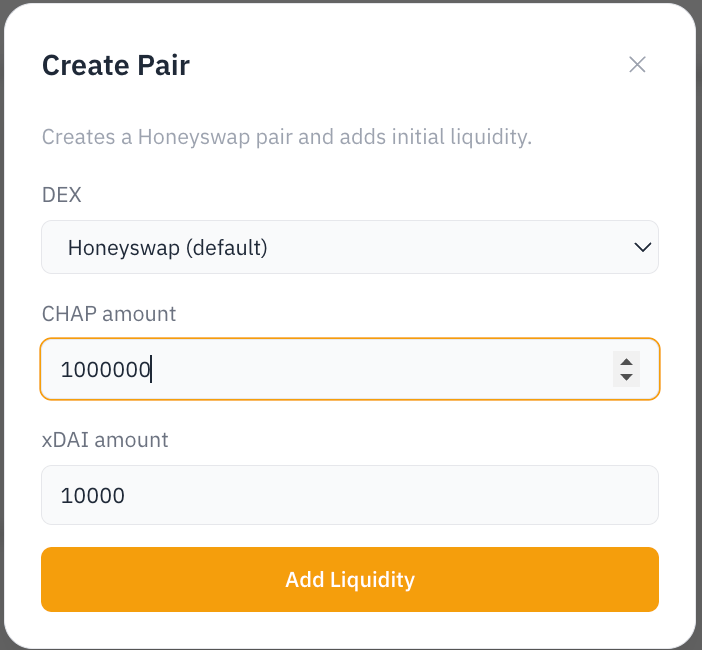
Pick the exchange (DEX) and what your coin trades against (e.g. ETH or SOL), then enter the two amounts:
- Coins paired: how many of your coins go into the pool; the rest stay in your wallet. Around 50% of supply is a common starting point. More makes a steadier market; less keeps more coins for airdrops, your team, or later.
- Native amount: how much ETH, SOL, etc. you put in alongside them. Together with the coins paired, this sets your opening price.
On EVM, once the pool is funded, open trading. If you'd rather wait, your coin stays non-tradable until you add liquidity from your coin manager.
Later, from your coin manager
Open your coin manager's owner-only Liquidity section. There you can:
- Pick the chain: add liquidity on any chain where you own the coin.
- Create a trading pair: open a new pool and fill it from your wallet. Where a chain has more than one exchange (for example Uniswap, Camelot, or SushiSwap on Arbitrum), pick the one your community uses.
- Add to an existing pair: deepen a pool you created, or link a pair you made on the exchange directly so it shows on your coin page.
- Open trading: right below the liquidity controls (EVM only; details below).
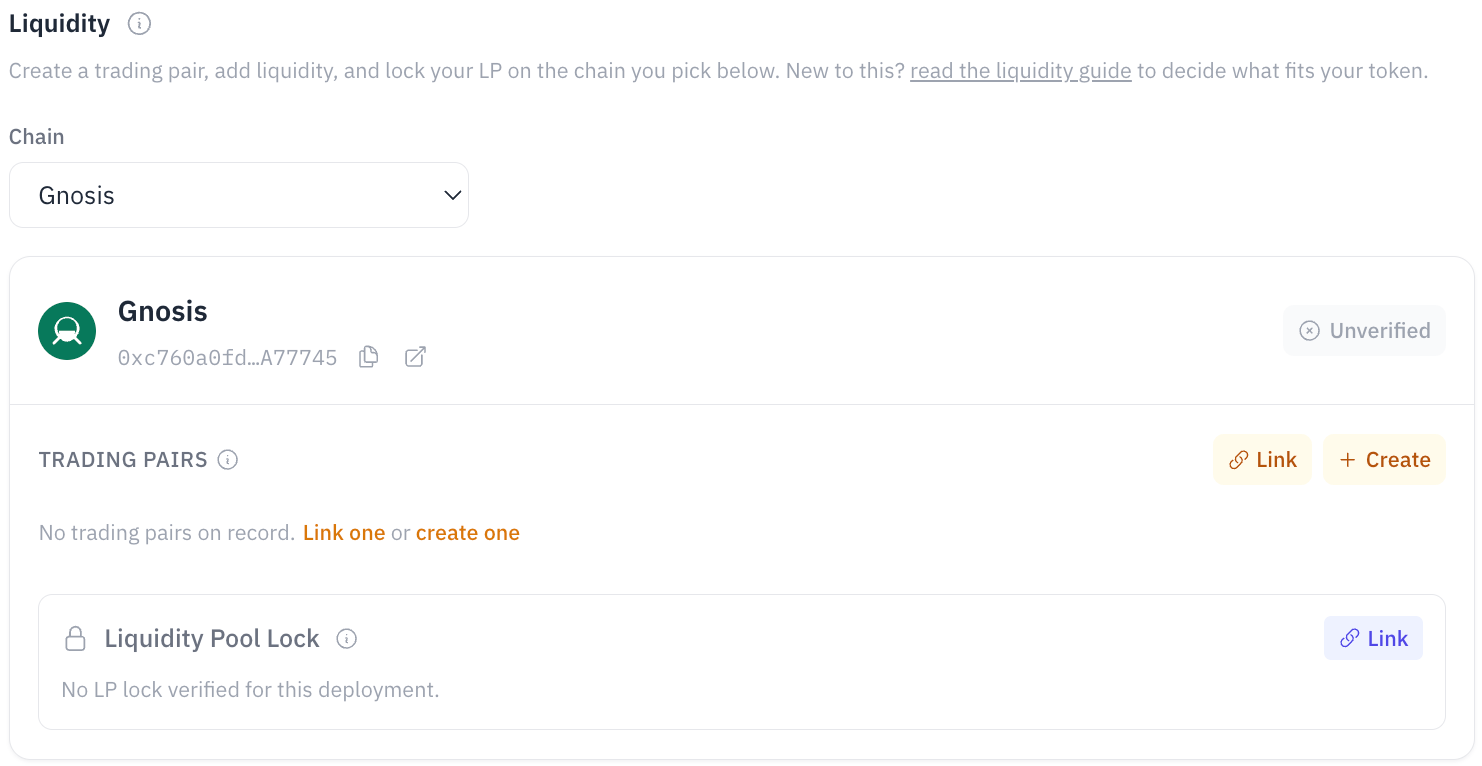
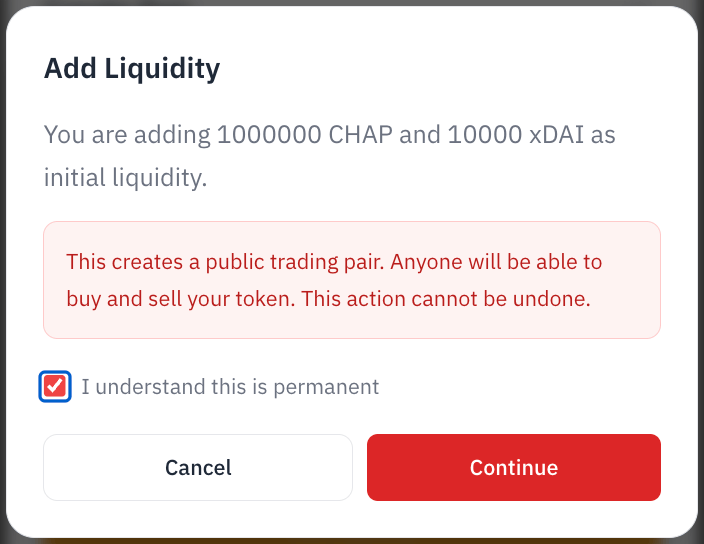
Create Pair opens a short form: choose the exchange, enter how much of your coin and of the native asset to put in, then Add Liquidity. Creating a pool is public and can't be undone, so you confirm before signing.
 |  |
Lock, burn, or keep your LP tokens
When you add liquidity, the exchange gives you LP tokens: a receipt for your share of the pool. Whoever holds them can take the money back out, so what you do with them is the first thing traders check when they ask "will they rug?" (pull the money out and leave).
| Choice | What happens | Can you get it back? | Good for |
|---|---|---|---|
| Lock | The LP tokens go into a time-lock contract until a date you pick | Yes, after the unlock date. Not before | Showing commitment while keeping the option to manage the pool later |
| Burn | The LP tokens are sent to an address nobody controls (0x…dEaD) | No. Permanent | The strongest signal, recognized by every tracker |
| Keep | You hold them yourself | Any time | A pool you're actively managing. Traders can see you can withdraw at any time |
Burning can't be undone
Once burned, nobody, including you, can pull that liquidity out.
How to lock
On EVM chains, lock from the Liquidity section of your coin manager, in one of two ways:
- Create a lock in the app: pick the amount and unlock date, and sign. The app uses UNCX on Ethereum, BNB Chain, Arbitrum, Base and Polygon, and the Chain Daddy Locker on Robinhood Chain and Avalanche.
- Add a lock you already made: paste the LP token address and the lock URL from UNCX, Team.Finance, or PinkSale, and Chain Daddy checks it on-chain.
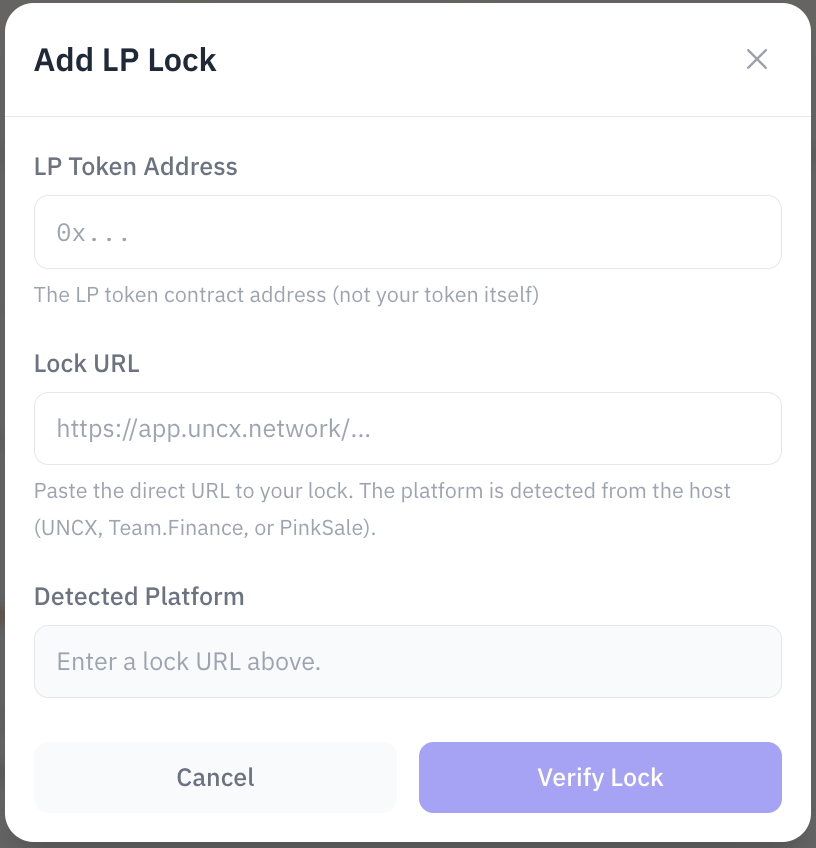
On Solana, your manager lists your trading pairs, and you lock or manage liquidity with the exchange's own tools.
The Chain Daddy Locker
On chains without a third-party locker, the app uses the Chain Daddy Locker, a free LP time-lock. It has no owner or admin, can't be upgraded, and has no function that lets anyone but you withdraw your LP, and only after your unlock date. It's at 0x3443aBcED09A7697C8298D00916597f53C14b563 on Robinhood Chain and Avalanche.
DexScreener's padlock
Sites like DexScreener and DexTools show a "locked" padlock only for lockers they track (UNCX, Team.Finance, and similar), and they don't track the Chain Daddy Locker. Anyone can still check your lock on-chain. If that padlock matters more to you than getting the LP back, burning is recognized everywhere.
The LP badge on your page
Your public coin page shows a Locked or Burned badge when the chain shows your LP is locked or burned, whichever locker you used. It's read from the chain, not from anything you enter.
| Chain | Lockers read |
|---|---|
| Ethereum, BNB Chain, Base, Polygon | UNCX, Team.Finance, PinkSale (PinkLock) |
| Arbitrum | UNCX, PinkSale (PinkLock) |
| Robinhood Chain, Avalanche | Chain Daddy Locker |
| Solana | Pools created through Chain Daddy, locked with UNCX |
| Launched with Launch a coin (any chain) | Always Locked |
- Only live locks count. A lock past its unlock date can be withdrawn, so it no longer counts.
- Burned means LP sent to
0x…dEaDor the zero address. - Team.Finance doesn't publish an unlock date per coin, so its badge shows the locked share without a date.
- The badge can take up to 10 minutes to update after you lock or burn.
Open trading (the final launch step)
On EVM chains, your coin starts with trading switched off, so adding liquidity alone doesn't open the market. You fill the pool while trading is closed, so no bot can buy before you're ready.
Once your pool is funded, press Open trading in the Liquidity section of your coin manager, right under the liquidity controls. Anyone can then buy and sell against your pool.
Open trading once, in the right order
- Fill the pool first. Opening before there's liquidity lets the first bot in with nothing priced against it.
- It's one-way. Trading can be switched on but never off again.
- Do it before you renounce ownership. Only the coin's on-chain owner can open trading. Renounce without opening it, and trading can never be opened.
- Chose "Renounce ownership at launch" without adding liquidity in the same step? Then trading opened when the coin was created, and this step doesn't apply. The anti-bot delay (deadblocks) started then too, so it has usually run out by the time your pool is filled.
What sets the price?
Your opening price is the ratio of the two sides of the pool: price per coin ≈ native amount ÷ coins paired. More ETH or SOL for the same coins means a higher opening price. After launch the price moves as people trade, and a bigger pool moves less.
The ETH or SOL you put in is real money: it moves from your wallet into the pool. Start with what you can afford. You can add more later.