
Submitting an App
You pack your app into one .capp file, your computer signs it, and you upload it. Chain Daddy checks it, hosts it, and a reviewer approves it. The commands are in Publish your first app; this page is what happens next.
You never host the build: Chain Daddy serves it from the apps CDN, and coin pages load apps from nowhere else. Only the compiled build is uploaded; your source stays on your machine. Everything in a package is public on that CDN except paid/, which is stored privately. An open-source app is submitted the same way, with its public repository in capp.json as repositoryUrl.
Every submission, new version and review request needs an active paid plan and the current Developer Beta Program agreement, on the day you send it.
What the checks look at
chaindaddy app submit --watch uploads the package and prints each check as it runs:
- The package: up to 8 MB (up to 128 MB with an
engine/or apaid/folder, which share the size tiers), every file matching the package's own list of fingerprints. - Who sent it: the package was signed by one of your computers' keys, within the last 24 hours, and
author.developerIdis your developer ID. - The manifest: the same schema
chaindaddy app validatechecks. - Hosting: your build is stored on the apps CDN under your app's name and version.
paid/is stored privately. - Security and size: code the sandbox refuses (
eval,new Function,document.cookie, sandbox escapes, data leaving the page), accessibility, and whether the manifest's permissions match what the build does. Every file of the package is also scanned for known malware (package_scanin the scan log); a match fails the build. - The boot check: the build is started once, the way a coin page starts it. See below.
chaindaddy app scan runs the security and size checks on your computer first. A check that fails stops the build: see When a check fails.
Build states
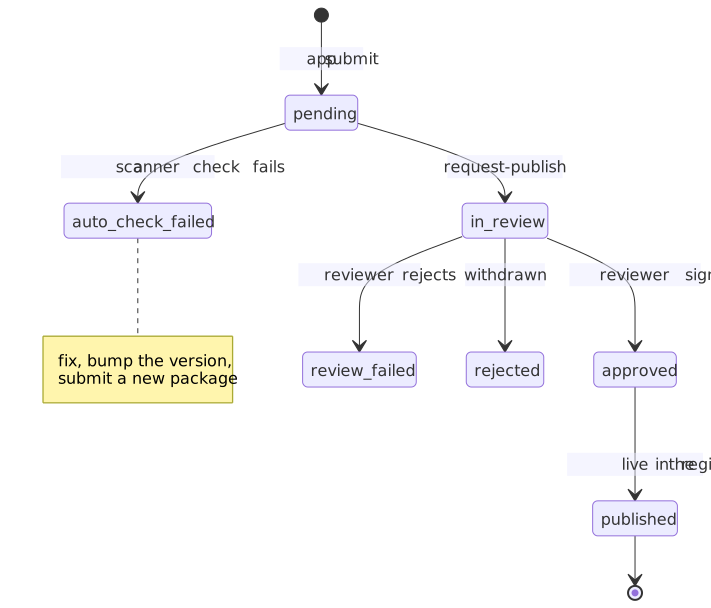
| Status | Meaning |
|---|---|
pending | Uploaded; the automated checks run, then it waits for you to send it for review |
auto_failed | An automated check failed; see chaindaddy app logs <id> |
in_review | Waiting for a reviewer |
approved | The live version, on every coin page's app list |
rejected | A reviewer turned it down; the notes say why |
superseded | You sent a newer build and it was approved first; this one was never judged, so it is not a rejection |
fetching | Only for a build published from your own storage: Chain Daddy is fetching it |
To send a checked build for review: press Submit for review on the app's Builds tab in the Developer Portal, or run chaindaddy app request-publish <id>. chaindaddy app submit --request-review does both at once. A reviewer approves or rejects it, and the decision and any notes show on that build.
An approved build stays live while you work on the next one; the next one replaces it only when it is approved.
Three builds in a row turned down pause your submissions; to ask us to lift the pause, write to support@chaindaddy.io. Each rejection says how many you have left. See Review checks.
The boot check
A build can pass every other check and still show a coin page nothing: a missing file, an error on the first frame, a script the sandbox refuses. So the last automated check starts it, in a browser of ours, the way a token page runs it (a web build, or a game published from your own storage, at its preview address), with sample token data, and writes one boot_check line to the scan log:
| Result | When | What happens |
|---|---|---|
passed | The app drew something and stayed up | The build goes on |
failed | It did not start: see below | The build is auto_failed, like any failed check |
inconclusive | The checker could not tell | Nothing: the build goes on, and a reviewer starts it by hand on the review page |
A failed line names the first thing that went wrong:
- An uncaught error, in your app or a worker it started:
Uncaught TypeError: Cannot read properties of undefined (reading 'map'). - One of your build's files did not load:
engine/index.pck did not load (HTTP 404). Usually a file the app asks for that is not in the package. - The app could not start: your bundle did not evaluate, or has no export named by
entryComponent; an engine export reported why it could not run. - A request the sandbox refused: a script, connection, frame, worker or form the frame's policy does not allow, or a
fetchto anywhere but the platform API. - Nothing drawn: the frame was still blank after 20 seconds (60 for an engine app).
While it runs, the check also records what the build does, and holds it against your manifest. A boot_behaviour line in the scan log lists it:
- Every host it sends a request to. One the frame refused that
network.originsdoes not declare fails the build, whatever the request was (an image or font as well as a connection): the build connected to https://cdn.example, which the manifest does not declare: add it to network.origins (with the net:connect permission) or remove the request. A Chain Daddy host can't be declared: reach the platform through the host's actions instead. - Every action it asks the host for. One whose permission
permissionsdoes not declare, or whose operationpayments.operationsdoes not list, fails the build: the build asked the host for sign-typed-data, which needs the wallet:sign permission the manifest does not declare. - Whether your code touches
document.cookie, or reaches for the page above its frame (window.parent,window.top). Both are warnings for the reviewer. Storage withoutstorage:localis a warning too: nothing it stores is kept.
The build runs as an unreviewed build does, so it has no network of its own until it is approved. If your app connects to a server you declared (net:connect) and then fails or draws nothing, the check is inconclusive, not failed: it can't tell your bug from its own limit. An app that shows something without its server passes.
A screenshot of what your app drew is kept with the build. Only you and the reviewer can see it: Builds → Screenshot in the portal.
Run the same check before you submit, with the Chrome, Chromium or Edge on your machine:
chaindaddy app scan --run                      # the static checks, then start it
chaindaddy app scan --run --screenshot out.jpg # and keep what it drew
Preview a build on your own coin page
A coin page you own or manage shows you your newest build that hasn't been decided yet (pending, auto_failed or in_review), with the badge Unreviewed preview — only you can see this. Everyone else still sees your approved version, or nothing if none is approved yet. It works from your first upload: nothing has to be approved first.
To put a build on a page:
- From the portal. On your app's Builds tab, press Preview on your token page on the newest build and pick the page.
- From the page. In your coin manager, choose Add Content, then Widget. Your builds lead the Add a widget list, under Your unreviewed builds (only you see these).
If the page already has your app, there is nothing to add: your newest undecided build takes the app's place for you.
Adding the app installs it on that page like any other app. Visitors see nothing in its place until one of its builds is approved, and the approved version from then on. It appears in nobody else's list and not in the Apps directory.
You see it when you're signed in to chaindaddy.io as the account that develops the app (a linked wallet counts) and that account owns or manages the page. Upload a new build and reload the page to see it.
The preview runs the way the approved build will, held to what review hasn't granted yet:
api-callcan only read (GET).sign-typed-data,transactionandiap-consumeare refused.- It has no network of its own:
net:connectstarts working once a build is approved. - Its paid files load for you with no purchase, and for nobody else.
- Sandbox violations are logged to your browser console, not reported, so a broken preview never counts against your published app.
A web build's preview, and that of a game published from your own storage, runs at an address of its own, as it will once approved, with storage apart from the approved game's. It lasts about an hour: if it says it has ended, reload the page.
A build that was rejected, or that belongs to an app we suspended or removed, has no preview. A build you host yourself has one only if it is a web build, once we have confirmed its CID holds the package you signed; for a Godot or Unity export, use Test locally.
When a check fails
The scan log names the rule. It is on each build in the portal (Builds → Scan log) and in chaindaddy app logs <id>:
[INFO]  package_signature    signature verified (keyId=cd_live_3f7c…)
[ERROR] csp_scan             1 CSP errors found
[INFO]  security_scan        0 critical, 0 high, 2 medium, 0 low
[ERROR] boot_check           failed: Uncaught TypeError: Cannot read properties of undefined (reading 'map')
Fix it, raise version in capp.json, and pack, sign and submit again. A version can be submitted once per app.
A build that is rejected, or that a newer approved build replaces before it is reviewed, can never go live, so the files we host for it are deleted. Keep your own copy of every package you submit.
After approval
Roll back a release. If a new build misbehaves, put an earlier approved build back live yourself:
chaindaddy app rollback <app> <version> # <app>: the slug or id from `chaindaddy app list`or press Make this build live on that build in the portal's Builds tab. Every coin page that has your app runs that version the next time it loads. Nothing is reviewed again, and your listing and installs are untouched.
- It takes effect on the next load. A coin page asks which build is live each time it loads, before it starts your app, so whoever opens or reloads the page after your rollback gets the build you chose. A page that is already open keeps the build it started with: reload yours to see the change.
- If a page gets no answer within four seconds (the visitor's connection, or ours), it runs the build it was drawn with. For up to fifteen minutes after a rollback that can be the build you rolled back from.
- Any approved build can go live, older or newer, so the same command switches back.
- A build that was never approved cannot. An approved build's files are kept for as long as the app is listed.
- An app we suspended or removed cannot be rolled back until it is restored.
- We record who rolled back, from which version to which, and when.
Watch it. Each app's page in the portal has Analytics (downloads, enables and the coin pages using it), Errors (runtime errors your app reported from coin pages) and Violations (sandbox reports from visitors' browsers and any action we took).
What we can do. Chain Daddy can still act on a live app: a warning, a suspension (the app leaves every coin page but its installs are kept, and it returns when restored) or a takedown (final: every install is removed, and every file we host for the app is deleted). We can also take down one build, which can then never go live again. Each shows on your app's Violations tab with the reason.
Ratings. Your app's page in the Apps directory shows 1 to 5 stars from the creators who have it on their own coin page. Only they can rate it, one rating per account, and you can't rate your own.
Store listing
Your app's page in the Apps directory is its store listing. Edit it in the portal, on your app's Store listing tab, without a new build.
| Item | Limit |
|---|---|
| Icon | 1. PNG, JPEG or WebP, up to 1 MB. Cropped to a centred square, at most 512 px |
| Screenshots | Up to 8. PNG, JPEG or WebP, up to 3 MB each. At most 1920 px on the long edge |
| Subtitle | Up to 80 characters |
| Description | Up to 4000 characters |
| Tags | Up to 5, each up to 24 characters |
| Website, support and privacy policy links | https:// only, up to 2048 characters |
Images are re-encoded on our servers with their metadata removed. SVG and animated images are refused.
An icon in your build. Put it in the package and name it in capp.json: { "icon": "assets/icon.png" }. It becomes your store icon when the build is approved. An icon you uploaded in the portal stays until a later build carries a different image.
Troubleshooting
| Symptom | Cause | Fix |
|---|---|---|
PAID_PLAN_REQUIRED | No active paid plan (a plan from a promo code counts; a free trial does not) | Subscribe at chaindaddy.io/_plans |
DEVELOPER_AGREEMENT_REQUIRED | Not joined yet, or the agreement changed since your wallet signed it | Sign the current one at chaindaddy.io/_developer |
PACKAGE_DEVELOPER_MISMATCH | author.developerId is not your developer ID | chaindaddy app whoami shows it. Fix capp.json, then pack and sign again |
PACKAGE_MANIFEST_INVALID | The manifest fails the schema | chaindaddy app validate names the field |
PACKAGE_SIGNATURE_MISMATCH, PACKAGE_UNKNOWN_KEY | The package was signed with a key your account no longer holds, or changed after signing | Run chaindaddy app sign --in-place again, then submit |
app slug already registered by another developer | Another app has this name | Rename it in capp.json |
The app shows in chaindaddy app dev but not on a coin page | The build is not approved yet, or the page has not added it | Check the build's status, then add it to the page |
Every endpoint the CLI calls is in the API Explorer, under Developer Apps. What is inside a package, and publishing from your own storage, are in the CLI reference.