
Runners and events
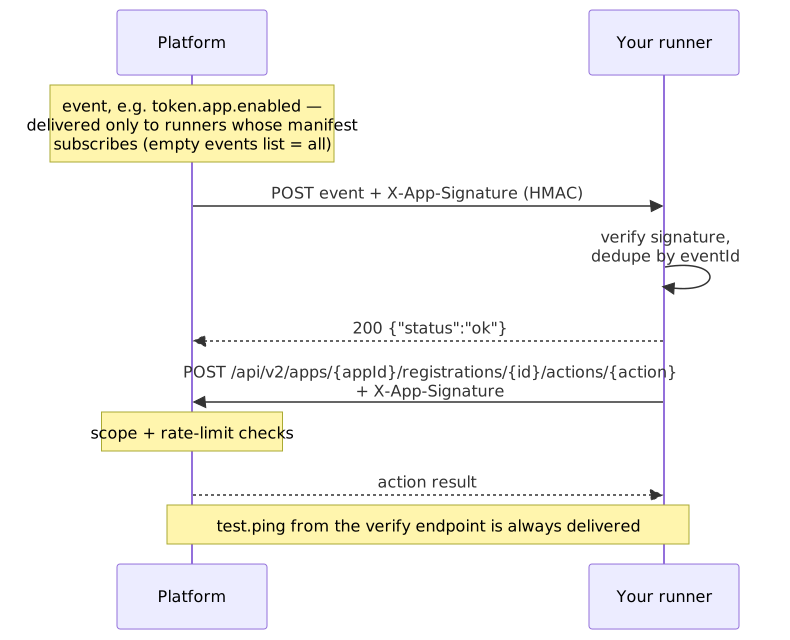
A runner is an HTTPS endpoint you host. The platform sends it signed events from the coin pages your app is on, and the runner can keep per-token data through the Action API. Most apps need none: an app that sells, signs players in or talks to its own server does all of that from the page (Actions). Add a runner when your own service must hear about a page with nobody on it.
An app with a runner has "type": "headless" (a runner alone) or "full" (a widget and a runner) in its manifest. chaindaddy app init headless my-runner scaffolds a plain Node server that checks signatures; deploy it anywhere that serves HTTPS. Deployable starters for AWS Lambda, Express with Docker and Cloudflare Workers are in the SDK repository's examples/. The runner SDK (npm install @chaindaddy/apps@beta) is optional.
Register a runner
The developer API key
The /api/v2/developer/* endpoints take a developer API key (chaindaddy keys create): send Authorization: Bearer cd_live_… plus X-API-Key: cd_live_…. Registering and verifying a runner need the current Developer Beta Program Agreement signed.
The call
curl -X POST "https://api.chaindaddy.io/api/v2/developer/apps/{appId}/runners" \
  -H "Authorization: Bearer $CD_LIVE_KEY" -H "X-API-Key: $CD_LIVE_KEY" \
  -H "Content-Type: application/json" \
  -d '{ "endpoint_url": "https://your-server.example.com/webhook", "auth_type": "hmac-sha256" }'
The 201 answer carries the runner's id, its health_status and, once only, its shared_secret. Store the secret as an environment variable (WEBHOOK_SECRET in the examples).
| Method | Endpoint | Description |
|---|---|---|
| POST | /api/v2/developer/apps/{appId}/runners | Register a runner |
| GET | /api/v2/developer/apps/{appId}/runners | List your runners, with each one's health and consecutive failures |
| DELETE | /api/v2/developer/apps/{appId}/runners/{runnerId} | Delete a runner |
| POST | /api/v2/developer/apps/{appId}/runners/{runnerId}/verify | Send a test.ping and answer reachable, status_code and latency_ms |
Authentication methods
auth_type (the manifest's authType) decides how both directions are authenticated.
auth_type | Platform to runner | Runner to platform |
|---|---|---|
hmac-sha256 (recommended) | X-App-Signature: the hex HMAC-SHA256 of the raw body, keyed with the hex-decoded secret the platform generated | A signed call: see Signing a call |
bearer | Authorization: Bearer {token}, a token you gave in auth_config: { "token": "…" } | The same header |
custom-header | Your header, from auth_config: { "header_name": "…", "header_value": "…" } | The same header |
hmac-sha256 proves both that a request came from the platform and that its body was not changed.
Verification
POST …/runners/{runnerId}/verify sends a test.ping. A 2xx answer marks the runner healthy and turns delivery back on if repeated failures had stopped it.
Receiving events
The platform filters every delivery against the runner.events list in your app's live (latest approved) manifest.
- The short forms
app.enabled,app.disabledandapp.configuredmatchtoken.app.enabled,token.app.disabledandtoken.app.configured. Declare either; deliveries carry the full name. - An empty or absent list receives everything. A non-empty list receives only the events it names.
test.pingis always delivered. An app with no approved build yet is not filtered.- To change your subscriptions, submit a new version.
Check the signature first. With hmac-sha256, compare the X-App-Signature header with the HMAC of the raw body, in constant time:
import { createHmac, timingSafeEqual } from 'node:crypto';

function verifySignature(secret: string, body: string, signature: string): boolean {
  const key = Buffer.from(secret, 'hex');
  const expected = createHmac('sha256', key).update(body, 'utf8').digest('hex');
  if (expected.length !== signature.length) return false;
  return timingSafeEqual(Buffer.from(expected), Buffer.from(signature));
}
Answer with any 2xx status within 30 seconds. The body is not read. Log an event type you don't recognize and answer 200, so your runner keeps working as the list grows.
Idempotency
An event may be delivered more than once. Before processing, check whether you have seen its eventId; if so, answer 200 and skip it. Otherwise process it and remember the id for 24 hours. The SDK's withIdempotency (@chaindaddy/apps/runner) wraps a handler with this, over a store you supply.
Retry policy
A failed delivery (an error, or no answer in time) is retried after 1 minute, 5 minutes and 30 minutes, then marked failed. After 10 failed deliveries in a row the platform stops delivering to the runner; a successful verification turns it back on.
The event envelope
{
  "eventId": "550e8400-e29b-41d4-a716-446655440000",
  "eventType": "token.profile.updated",
  "timestamp": "2026-01-15T10:30:00Z",
  "appId": "4e82adad-1cf0-4214-a4d6-b324c5f60442/profile-sync",
  "crownId": "42",
  "chainId": "eip155:42161",
  "crownConfig": { "threshold": 0.05, "channel": "#alerts" },
  "payload": { }
}| Field | Description |
|---|---|
eventId | Unique UUID. Use it for idempotency |
eventType | One of the event types |
timestamp | ISO 8601 time the event was generated |
appId | Your app ID |
crownId | The coin page's registration id: the number Chain Daddy gave the page on its chain |
chainId | The coin page's chain, as a CAIP-2 id (for example eip155:42161) |
crownConfig | The token owner's settings for your app on this page (App config). {} if not configured. Not present on test.ping |
payload | Event-specific data |
The headers X-App-Event-ID, X-App-Event-Type and X-App-Timestamp repeat eventId, eventType and timestamp.
Event types
| Event | When | payload |
|---|---|---|
token.profile.updated | The coin page's profile was saved | crownId, symbol, chain, updatedFields (the profile fields that changed) |
token.heartbeat.warning | The registration is at risk of going inactive | crownId, symbol, chainKey, currentScore, threshold, timestamp |
token.heartbeat.critical | The registration went inactive | crownId, symbol, chainKey, currentScore, daysToInactive, timestamp |
token.heartbeat.recovered | The registration's heartbeat recovered | crownId, symbol, chainKey, currentScore, previousScore, timestamp |
token.app.enabled | A token owner enabled your app on their page | symbol, chainKey, appId, appName, enabledBy, config (always {}; the settings are in crownConfig) |
token.app.disabled | A token owner disabled your app on their page | symbol, chainKey, appId, appName, disabledBy |
token.app.configured | The owner or a manager saved your app's settings | crownId, chainKey (a CAIP-2 id), newConfig (the config as saved, not the previous one or who saved it) |
test.ping | Verification. Its envelope has no crownConfig, and empty crownId and chainId | message |
In the heartbeat warning and critical events the scores are fixed values, so act on the event type, not the numbers.
{ "crownId": "42", "symbol": "DOGE", "chain": "eip155:42161", "updatedFields": ["description", "website"] }Runner Action API
A runner calls the platform directly. What is live today is per-token storage, under the apps:storage:write scope in the manifest's runner.actions.
https://api.chaindaddy.io/api/v2/apps/{appId}/registrations/{id}/actions/{action}?chain={chain}{appId} is the app the runner is registered under, {id} the coin page's registration id and {chain} its chain (a chain key such as base, a chain id or eip155:…). Always send ?chain=: storage is kept per chain. Every call carries your runner's credential (Authentication methods); no API key is needed. An answer is { "success": true, "action_id": "…", "status": "executed", "data": { } }, and a refusal is an HTTP error with { "error": "…" }. Request bodies are capped at 1 MB.
Signing a call
With hmac-sha256, send two headers:
X-App-Timestamp: the current Unix time in seconds.X-App-Signature:v2=and the lowercase hex HMAC-SHA256, keyed with your hex-decoded secret, of these five lines joined by\n:v2 {X-App-Timestamp} {method, upper case} {path and query, exactly as sent} {raw body; empty for a GET or DELETE}
The signature works for that one call only, and is accepted for 5 minutes either side of the platform's clock. The SDK's createActionClient (@chaindaddy/apps/runner) signs for you.
import { createHmac } from 'node:crypto';

async function callAction(method: string, url: string, body = '') {
  const u = new URL(url);
  const timestamp = Math.floor(Date.now() / 1000).toString();
  const signed = ['v2', timestamp, method, u.pathname + u.search, body].join('\n');
  const signature = createHmac('sha256', Buffer.from(process.env.WEBHOOK_SECRET!, 'hex'))
    .update(signed, 'utf8')
    .digest('hex');
  return fetch(u, {
    method,
    headers: {
      'Content-Type': 'application/json',
      'X-App-Timestamp': timestamp,
      'X-App-Signature': `v2=${signature}`,
    },
    ...(body ? { body } : {}),
  });
}

await callAction('POST', `${base}/apps.storage.set?chain=base`,
  JSON.stringify({ key: 'lastAlert', value: { price: 0.1 } }));
await callAction('GET', `${base}/apps.storage.get?key=lastAlert&chain=base`);| Status | error | When |
|---|---|---|
400 | token id must be a positive number | |
401 | no runners registered for this app | |
401 | X-App-Signature must be v2=<hex>: … | a signature without v2=, such as the body-only one used before 2026-10-01 |
401 | X-App-Timestamp must be the Unix time in seconds, within 5 minutes of the server's clock | |
401 | invalid runner credentials | no runner of the app matches the credential |
403 | runner is temporarily suspended due to rate limit abuse | see Rate limits |
403 | this app is not installed on this token page | the coin page, on that chain, does not have your app |
Storage
Key-value storage your runner keeps per app, per coin page and chain: one app cannot read another's. Values are any JSON.
Limits: 100 keys, 10,240 bytes per value (as sent), 512,000 bytes in all, per app per coin page. Keys are up to 255 characters.
| Call | Request | data |
|---|---|---|
POST …/apps.storage.set | { "key": "lastAlert", "value": { "price": 0.1 } } | none |
GET …/apps.storage.get?key=lastAlert | { "key", "value", "updated_at" } | |
GET …/apps.storage.list | { "keys": ["lastAlert", …] } | |
DELETE …/apps.storage.delete?key=lastAlert | none; also for a key that does not exist |
| Status | error |
|---|---|
400 | request must include 'key' (string) and 'value' (JSON) |
400 | key query parameter is required |
400 | maximum of 100 keys per app+crown exceeded |
400 | value exceeds maximum size of 10240 bytes |
400 | total storage exceeds maximum of 512000 bytes |
404 | key not found |
Rate limits
Storage calls are limited to 120 a minute per runner, in a sliding window. Every call that passed authentication carries X-RateLimit-Limit, X-RateLimit-Remaining and X-RateLimit-Reset (Unix seconds). Past the limit the answer is 429 {"error":"rate limit exceeded"} with Retry-After in seconds: wait that long, then retry. A runner refused for its rate 10 times within 5 minutes is suspended for an hour, and every call answers 403 until then.
Action log
Every runner action is logged, executed or refused, and the token's owner and managers can read the log, signed in: GET /api/v2/registration/{id}/app-actions, filtered by app_id, action_type (for example apps.storage.set), status (executed, denied or failed), start_date and end_date (RFC 3339), with limit (default 50) and offset.