
Docs Screenshot Factory
Repeatable Playwright harness that captures product screenshots — and short MP4 loop clips — for the docs site, so docs images stop rotting. Still surfaces are declared in config.ts and captured by capture.ts; scripted journey clips live in clips.ts. Output goes to public/screenshots/auto/ (stills + manifest.json) and public/screenshots/auto/clips/ (MP4s + their own manifest.json), each manifest recording what was captured, when, and against which base URL.
Run it
cd website/docs
npm install                          # once — installs playwright (the library)
npx playwright install chromium      # once — installs the browser binary
npm run docs:screenshots             # capture everything
Useful variants:
npm run docs:screenshots -- --only homepage,search-results   # subset
BASE_URL=https://staging.chaindaddy.io npm run docs:screenshots  # app override
DOCS_BASE_URL=https://docs.staging.chaindaddy.io npm run docs:screenshots
Off the live CDN, and without a live session
Every clone on the machine shares one public IP, and the frontend WAF allows 2000 requests per 5 minutes per IP; a cold page load is ~130 of them, so a batch of captures against chaindaddy.io can lock every session out at once. Serve the app from the build prod is running instead — the page still loads at https://chaindaddy.io (so the app picks prod's API host and CORS holds), but nothing reaches the CDN:
# build:frontend artifact of the pipeline whose deploy:frontend:prod is live
glab api "projects/opencrown%2Fchain-daddy/jobs/<build:frontend id>/artifacts" > fe.zip && unzip -q fe.zip -d fe
APP_DIST=$PWD/fe/website/dist npx tsx scripts/screenshots/<side-car>.ts
Check its assets/main-*.js against curl -s https://chaindaddy.io/ | grep -o 'assets/main-[^"]*'.
Surfaces whose fetches wait for an access token can run without the owner's exported session: newCaptureContext(browser, { …, fakeSession: true }) answers the boot refresh with an unsigned token naming the fake wallet and strips it from every request, so the live API sees anonymous calls. Public data comes back real; mock the session-only endpoints the shot needs.
Output: public/screenshots/auto/<surface-id>--<viewport>--<theme>.png plus public/screenshots/auto/manifest.json. --only runs merge into the existing manifest — other surfaces' entries are preserved, and only the files captured by the run are (re)quantized.
If pngquant is installed (brew install pngquant), captures are quantized after the run (~70% smaller, visually lossless on UI chrome). Install it before committing refreshed images — these PNGs live in git.
Clips (npm run docs:clips)
clips.ts records scripted PUBLIC journeys with Playwright's video recorder and transcodes them into short, muted, loopable H.264 MP4s for docs embeds:
brew install ffmpeg                  # once — required for the transcode
npm run docs:clips                   # all clips
npm run docs:clips -- --only find-your-token
Output: public/screenshots/auto/clips/<clip-id>.mp4 plus a clips-local manifest.json (duration, size, CRF, applied speedup). Standards: 1440×900 light theme, ≤1440px wide H.264 (yuv420p, +faststart), no audio track, 6–15s target. Live-site load times vary run to run, so the transcode time-compresses long recordings toward ~13.5s (capped at 2×; the factor is recorded in the manifest). The pre-first-paint lead is trimmed so loops restart on real content, and WebM originals are deleted after transcode.
If ffmpeg is missing the run skips cleanly with a message (same contract as the pngquant skip) — no clips are produced. Clips are local-run only: the CI docs:screenshots job's node image has no ffmpeg, so it does not run clips. Record locally and commit the MP4 (each stays ≲2MB by construction).
Embed clips as raw HTML in markdown (VitePress passes it through), using a factory still as the poster:
<video autoplay loop muted playsinline poster="/screenshots/auto/homepage--desktop--light.png">
  <source src="/screenshots/auto/clips/find-your-token.mp4" type="video/mp4" />
</video>
Adding a clip = add an entry to CLIPS in clips.ts with a stable id (renaming breaks embeds) and a journey function. Journeys must be public/no-auth, use explicit data-testid/text-pinned waits, and hold on each beat — steady pacing reads better than a rushed cursor.
Standards (encoded in config.ts)
- Viewports: 1440×900 (
desktop) and 390×844 (mobile) - Themes:
light+dark— driven byprefers-color-schemeand pinned via each site's storage key (chain-daddy-theme,vitepress-theme-appearance) - deviceScaleFactor 2 — retina-sharp images
- No personal data — public/no-auth surfaces only: no wallets, no sessions, no user names. The capture context also pre-declines analytics consent, so runs never skew product analytics (and the consent banner never appears in shots).
- Deterministic readiness — every surface declares an explicit
readySelector; the runner additionally waits for network idle (bounded) and for loading skeletons to disappear (goneSelector), withreducedMotion: reduceand CSS animations disabled at capture time.
Adding a surface
Add an entry to SURFACES in config.ts:
{
  id: 'my-surface',            // stable! renaming breaks docs embeds
  path: '/_something',         // joined onto the base URL
  base: 'app',                 // 'app' → chaindaddy.io, 'docs' → docs.chaindaddy.io
  readySelector: '[data-testid="thing"]', // must be VISIBLE before capture
  goneSelector: '.skeleton',   // optional: must be GONE before capture
  settleMs: 1500,              // optional: extra delay for images/animations
  fullPage: false,             // viewport crop (default) vs full scroll height
  notes: 'What this shows and any gotchas',
}
Guidelines:
- Prefer deep links that load their own state (e.g.
/_search/PEPE) over scripted typing — reproducible from the URL alone. - Prefer
data-testidready selectors; a text-pinned heading (h1:has-text("Plans")) is the fallback. A bareh1is too weak — error pages have headings too (that exact bug:/_plansrendered "Profile Not Found" on prod and a bare-h1wait happily captured it). - Viewport crop is the default; use
fullPageonly where the whole page is the point (docs landing).clipHeightcrops to the top N CSS pixels — for pages whose lower half is live third-party content (embedded DEX charts) that reads broken in a still. skipThemes/skipViewportstrim the matrix where variants add no information (the themed token pages are desktop-light only — the hero banner is the subject).- The demo token is pinned to
DEMO_SYMBOL(PEPE) — chosen by probinghttps://api.chaindaddy.io/api/v2/search?q=<sym>for a query with rich, logo-heavy results. Re-probe before changing it. - The distinct-branding pages are pinned to
THEMED_SYMBOLS(PENGU, POPCAT, BRETT) — chosen by rendering popular symbols headless and keeping the ones whose hero banner is a real, reliably-loading image. Prod has no claimed registrations yet, so these show metadata-driven auto-branding, not owner themes; swap in genuinely owner-themed pages once they exist. - A
symbol-overviewsurface (/PEPE/all) for the cross-chain docs is deferred: prod currently renders "Invalid symbol" there (route-param bug, fixed inwebsite/src/pages/SymbolOverview.tsxbut not yet deployed). See the commented-out entry inconfig.ts.
Embedding in docs
Reference captures like any static asset:
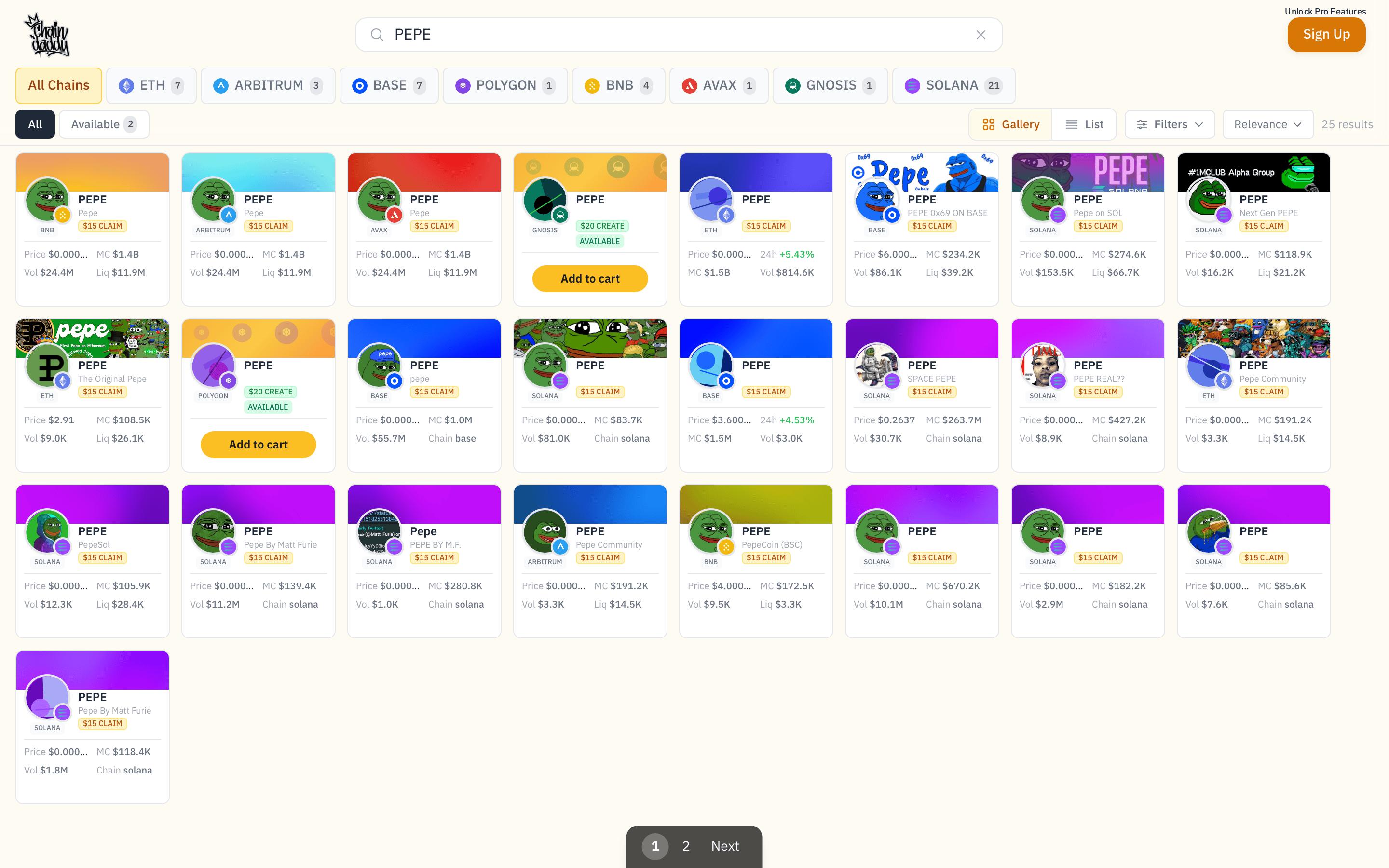Rule: docs MRs that change UI-adjacent copy should re-run the factory and commit the refreshed images alongside the copy change. That is the whole point — the screenshot pipeline is one command, so there is no excuse for a doc describing UI that no longer exists.
CI
docs:screenshots is a manual job in .gitlab-ci.yml (test stage, allow_failure: true). It runs the still-capture factory against production and uploads public/screenshots/auto/ as artifacts for review — it does not commit. Trigger it from any pipeline when you want fresh captures without a local checkout, then download the artifacts and commit the ones you want. The job does NOT run docs:clips — its node image has no ffmpeg; clips are recorded locally (see Clips above).
Legacy screenshots (public/screenshots/*.png)
These are 1×1-pixel placeholder stubs (67-69 bytes), not real screenshots. Superseded by real authed captures: manager-profile.png → auto/manager-profile--desktop--light.png; token-creation-config.png → auto/wizard-identity--desktop--light.png; token-creation-complete.png → auto/wizard-summary--desktop--light.png (see Wizard journey below); token-creation-chains.png → auto/create-chains--desktop--light.png (the Launch wizard chain step, deep-linked ?launch=1&fee=fixed&symbol=…&step=chains, public); profile-public.png → auto/token-page-claimed--desktop--light.png (CHAP's public claimed page). Still stubbed: quickclaim-detected.png (needs a wallet that owns UNCLAIMED tokens + the claim flow — the read-only capture wallet owns already-claimed CHAP, and claiming mints), and listing-export-*.png (the docs describe an "Export Listing Data" button that is not in the codebase — like the holder badge, an unbuilt feature). Orphan stubs (search-symbol.png, connect-wallet.png, quickclaim-confirmation.png, claim-success.png) are unreferenced.
airdrops-capture.ts (reaches the Airdrops tab via the Community|Airdrops toggle — client-side, keeps the session hot) is ready, but the backend returns "unauthorized" for the airdrop operator API on CHAP (the Pro+ airdrop entitlement is still propagating) — re-run it once that's live.
Wizard journey (npm run docs:wizard)
wizard-capture.ts drives a demo draft order (wizard-mock.ts) through every coin-creation step under a fake session and writes wizard-<step>--desktop--light.png. It clicks Continue to advance client-side and stops before the final Launch/mint button, so the read-only wallet never signs. No exported session or real order is needed:
APP_DIST=<dist> npm run docs:wizardAuthed flows (npm run docs:auth-session)
Authed surfaces (auth: true in config.ts, e.g. my-tokens) load a real session exported from the owner's Chrome. The app's auth is an HTTP-only refresh cookie, so the session cannot be minted headlessly — the owner logs in once and exports it:
- Quit Chrome fully (Cmd+Q), relaunch with the debug port:
open -a "Google Chrome" --args --remote-debugging-port=9222 - Be logged in on chaindaddy.io (wallet + SIWE) in that Chrome.
npm run docs:auth-session— connects over CDP, verifies the session, writes chaindaddy.io-only cookies/origins toscripts/screenshots/.auth/session.json(git-ignored, mode 600).- Quit + relaunch Chrome normally (closes the debug port).
npm run docs:screenshots -- --only my-tokens
Rules: the state file is a live credential — never commit or upload it; delete it (or log out on chaindaddy.io) to revoke. Authed surfaces are SKIPPED with a warning when the file is absent, so CI never runs them. Blur personal data with maskSelectors (public on-chain addresses are fine to show). Capture only owner-consented account surfaces — never billing or email settings.