Skip to content

Cross-Chain

Manage your token's presence across multiple blockchains with unified ownership and metadata.

Overview

Cross-chain linking gives your token one name recognized on every chain. Instead of managing separate registrations independently, your per-chain registrations are linked as peers — they share metadata and present a unified token page.

What you get:

  • One name aggregating all your chain deployments
  • Unified metadata synced across all linked registrations
  • Token List standard output for wallet and exchange auto-ingestion
  • Shared token page data across all chains

Adding a Chain

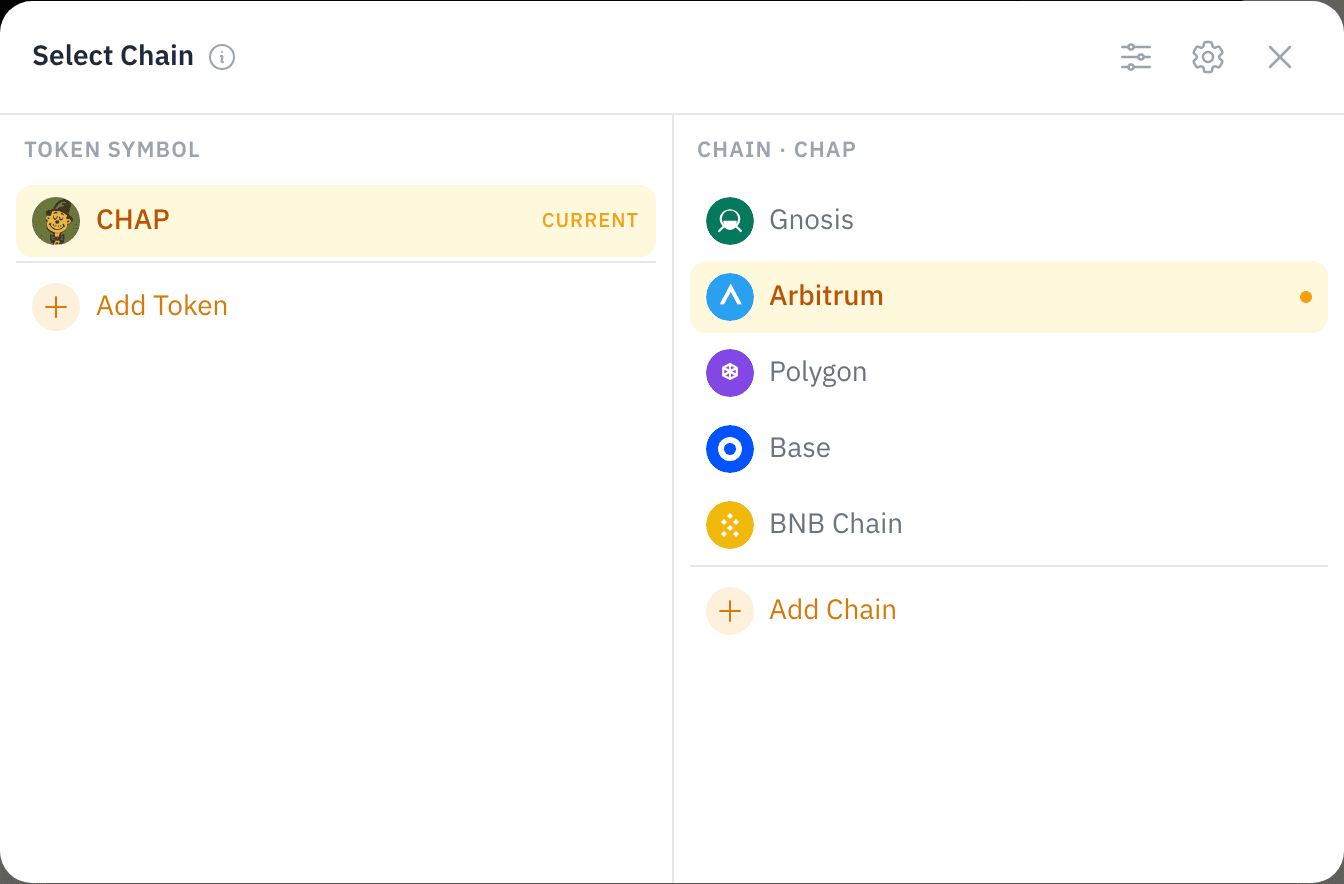
  1. Start from your token page or Token Manager: open the chain switcher and select Add Chain

The chain switcher for CHAP — the current chains (Gnosis, Arbitrum, Polygon, Base, BNB Chain) with an "Add Chain" entry

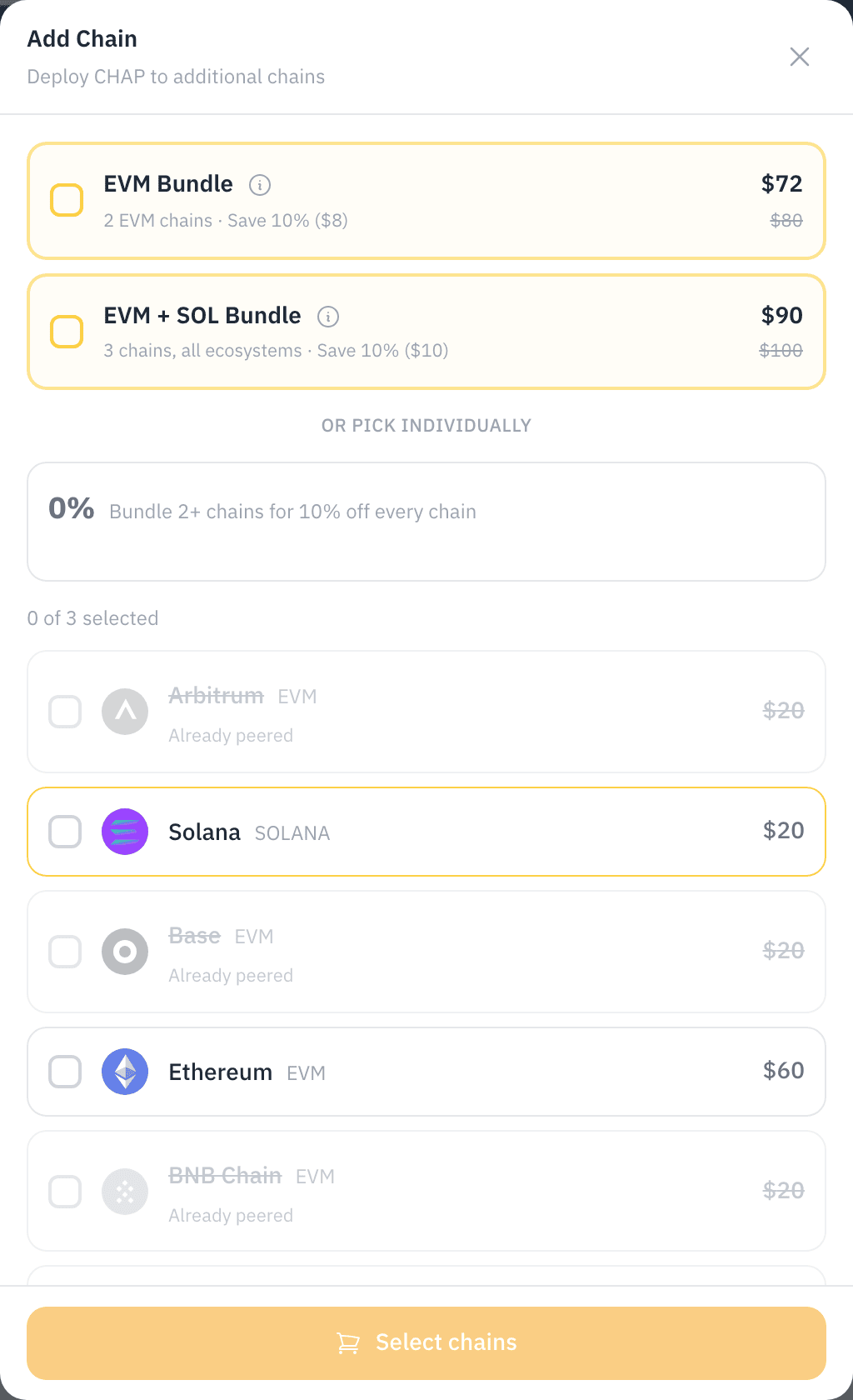
  1. Pick the chain: Chains you already have a registration on are marked "Already peered" and can't be double-added. Bundle two or more chains in one order for a 10% discount

The Add Chain picker — bundle options, per-chain pricing, chains already registered marked "Already peered", and a "Select chains" cart button

  1. Register or create on that chain: Priced as a normal per-chain registration (or creation + registration) — see pricing. Registering 2+ chains in one order gets the multi-chain bundle discount
  2. Done: The new registration links to your existing ones automatically — no extra step, no linking fee

After the new registration confirms, all your chains appear together on the ticker's public token page.

Same wallet, not same creator

Linking is keyed on the wallet that owns the registrations — not the wallet that created each token:

  • To link, register from the same wallet. Registrations only group into one token page when the same wallet owns them on every chain. Registrations made from different wallets stay separate.
  • The token itself can come from anywhere. Each chain's token may have been deployed or created by a different wallet. What matters is that the wallet you're registering with passes that chain's ownership verification — deployer, contract owner, mint/update authority (Solana), or majority holder all qualify.

Supported Chains

ChainTypeToken StandardNotes
EthereumEVMERC-20Higher gas costs
ArbitrumEVMERC-20Low gas costs
BaseEVMERC-20Shared address across EVM chains
PolygonEVMERC-20Shared address across EVM chains
BNB ChainEVMERC-20Shared address across EVM chains
AvalancheEVMERC-20Shared address across EVM chains
GnosisEVMERC-20Shared address across EVM chains
SolanaSVMSPLNative program, lowest fees

EVM Same-Address Deployment

Tokens created through Chain Daddy on EVM chains share the same contract address across all EVM deployments, simplifying integration.

Solana Native Registrations

Solana registrations use native program accounts with Metaplex NFT compatibility. They appear in standard Solana wallets and can be linked to EVM registrations for cross-chain presence.

Linking Is Automatic

There is no separate linking step and no linking fee. When the same wallet registers the same ticker on another chain, the registrations link automatically as peers — you get:

  • One name linking all your chain registrations
  • Cross-chain metadata synchronization
  • Token List standard inclusion

One signature per chain

"Automatic" means there's no separate linking step, transaction, or fee — the peering that groups your registrations happens on its own. But each chain's registration is its own on-chain action, so you sign once per chain as you add it. Registering on three chains is three signatures (one per registration); the grouping into a single token page then happens automatically, with no extra signature.

INFO

Multi-chain bundles are simply the discounted way to buy several chains at once — every multi-chain registration links automatically, bundled or not.

How Linking Works

One name recognized on every chain — that's the whole model. Each ticker (e.g., DOGE) groups all per-chain registrations owned by the same wallet as equal peers, so your Arbitrum, Solana, and Base registrations present as one token, not three.

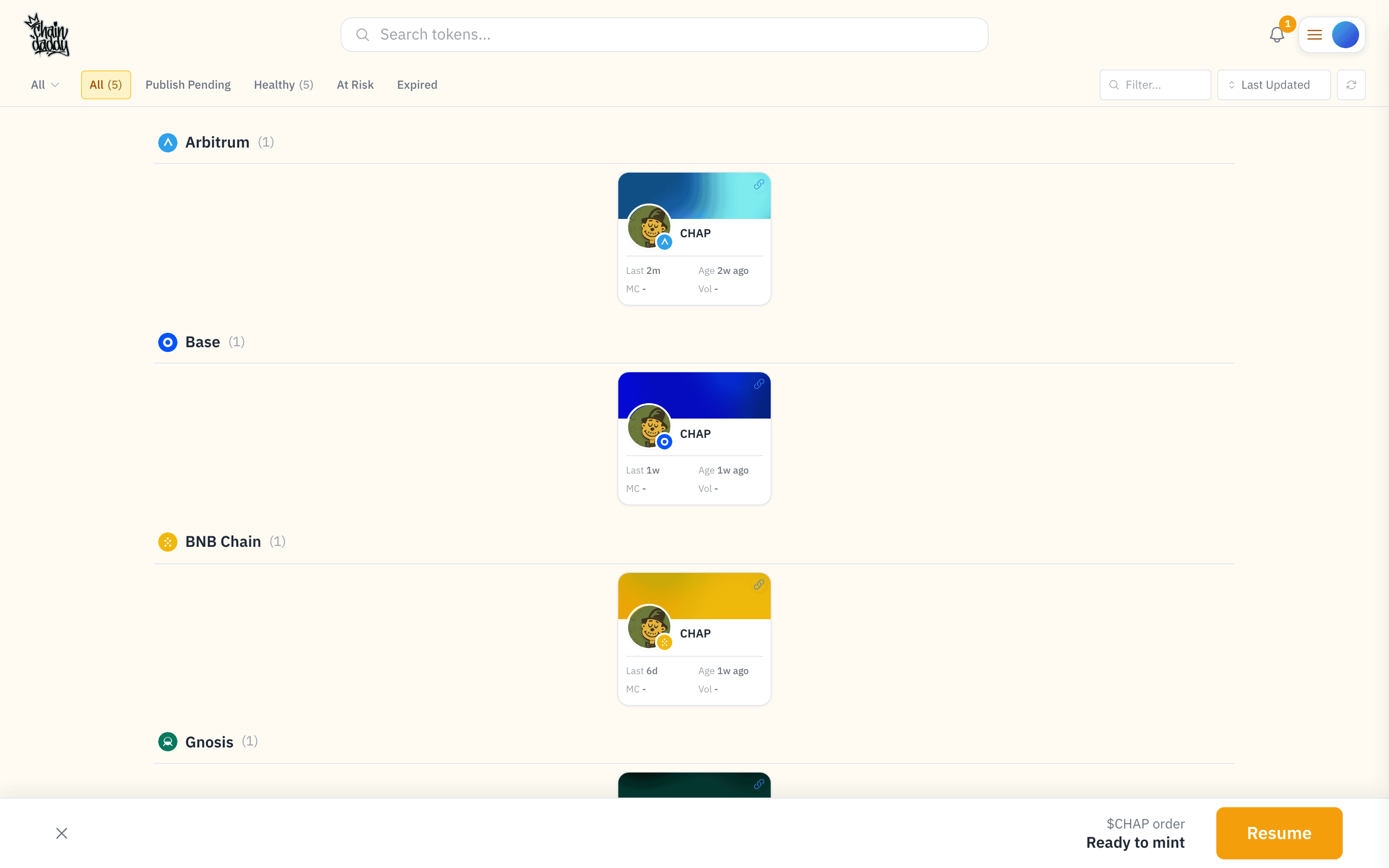
My Tokens dashboard — one ticker (CHAP) held by the same wallet across Arbitrum, Base, BNB Chain, Gnosis, and Polygon

Owners see the same peer group grouped by chain in their dashboard: one ticker claimed on five chains by the same wallet, presented as one token.

Ticker Structure

Ticker: DOGE
└── Linked Registrations (same wallet):
    ├── Arbitrum  → doge-arb
    ├── Solana    → doge-sol
    └── Base      → doge-base

Key concepts:

ConceptDescription
TickerTop-level grouping for a token name across all chains
Linked RegistrationsPer-chain registrations owned by the same wallet, sharing metadata
RepresentationA per-chain registration under the ticker

Peer Model

All linked registrations are equal. There is no "primary" or "master" designation. When the same wallet owns registrations for the same ticker on multiple chains:

  • All registrations share a single set of metadata
  • Editing any registration's metadata updates all linked registrations
  • Each registration resolves independently via its chain-specific URL

One registration per chain per wallet

A wallet's peer group for a ticker admits at most one registration per chain. You can own DOGE on Arbitrum and DOGE on Base and DOGE on Solana — three distinct entries in the same peer group — but you cannot hold two Solana DOGE registrations under the same wallet. Attempting to add a second registration on a chain you already peer (for example, a second Solana DOGE registration with a different token address) is rejected at every layer: the Add Chain picker crosses the chain out with "Already peered", the API rejects the request before any transaction is built, and the on-chain registry reverts DuplicateChainInPeerGroup if a transaction still reaches it.

If you need to re-point a chain slot at a different token (for example, migrating DOGE on Solana from an old mint to a new one), remove the existing peer first, then add the new one. To keep multiple registrations of the same ticker on the same chain, use a different wallet — peer groups are per (ticker, wallet), so a second wallet can carry its own independent registration on that chain.

Unified Metadata

When registrations are linked, metadata changes sync across all representations:

FieldBehavior
NameShared across all linked registrations
DescriptionShared across all linked registrations
LogoShared across all linked registrations
Social linksShared across all linked registrations
Token addressPer-chain (unique to each representation)
Contract detailsPer-chain (unique to each representation)

WARNING

Chain-specific fields (token address, contract details) remain unique per representation. Only registration-level metadata syncs across chains.

Token List Standard Output

Linked registrations automatically generate a Token List compatible JSON file. This follows the widely-adopted token list standard used by wallets and exchange aggregators.

What it includes:

  • Token name, symbol, decimals
  • Per-chain contract addresses with chain IDs
  • Logo URI from your token metadata
  • Version tracking for updates

Endpoints:

GET /tokenlist.json              # All verified tokens
GET /tokenlist/arbitrum.json     # Chain-specific list
GET /tokenlist/solana.json

Wallets and exchanges can subscribe to your token list for automatic metadata updates without manual listing applications.

TIP

Combined with Listing Export, cross-chain linking gives you one-click distribution of your token data to all major platforms.

Verification by Chain

Ownership verification methods differ between EVM and Solana due to different program and contract models. See Verification Methods for the full chain-vs-method matrix — deployer, contract owner, mint/update authority (Solana), and majority holder — and how strength rankings apply.

Costs

ActionFee
LinkingFree — automatic when the same wallet registers the same ticker on 2+ chains
Adding a chainNormal per-chain registration/creation fee (see pricing)
Metadata syncFree
Token List inclusionFree

TIP

Registering multiple chains in one order qualifies for multi-chain bundle discounts. See Create a Token for bundle options, and Registration & Creation Pricing for the current rate card.