
Authentication
The API is at https://api.chaindaddy.io. Every call from your own code carries an API key: a secret string that says which Chain Daddy account is calling. This page gets you a key, makes one call with it, and explains the errors you are most likely to meet first.
You do not need a crypto wallet for any of it.
1. Get a key
- Open chaindaddy.io and sign in. Email, Google, Apple or X all work. A wallet (an app that holds crypto and signs for you) is one more way to sign in, not a requirement.
- Open chaindaddy.io/_api.
- Click Generate API Key.
- Copy the key into wherever your server keeps secrets. It is shown once.
A key is cd_live_ followed by 64 hexadecimal characters. Regenerate on the same page revokes the old key at once and shows a new one. A Free account's key is enough to build and test with.
Keep it on your server
Never commit a key, and never ship one in a web page or an app. Whoever holds it calls the API as your account.
Working from a terminal instead? The CLI signs in through your browser with chaindaddy login.
2. Send it in X-API-Key
Put the key in the X-API-Key header of every request. Authorization: Bearer cd_live_… also works; if you send both, X-API-Key is used.
3. Make one call
In a terminal, put your key in a variable, then ask for one token on one chain (a chain is a blockchain network, such as Base):
export CHAINDADDY_API_KEY=cd_live_YOUR_KEY_HERE

curl -H "X-API-Key: $CHAINDADDY_API_KEY" \
  "https://api.chaindaddy.io/api/v2/token/FLUXGP/base"
You should see JSON like this (trimmed):
{
  "chainId": 8453,
  "chainKey": "base",
  "chainName": "Base",
  "token": {
    "address": "0x931fce21ddea0549db70324f44ee2db1cb9f7f22",
    "symbol": "FLUXGP",
    "name": "Flux GP",
    "priceUsd": 0.0000377954,
    "holders": 12
  },
  "registration": { "status": "claimed", "owner": "0x2ca75898788f3aad05e7e4ff247f3db13456b0b4", "tokenId": 8 },
  "hasCrown": true
}
A registration is the on-chain record that a wallet proved it controls a token; it is what gives the token its verified page. tokenId is the registration's id on that chain. Some responses call the same object crown.
Every other endpoint, with its parameters and responses, is in the API Explorer, where you can call it from the page.
4. If you get a 401
Read the error field.
error | What happened | What to do |
|---|---|---|
api_key_required | No usable key arrived: none was sent, or the one sent is mistyped or was regenerated. This is the usual first error. The API answers keyless requests only when they come from chaindaddy.io's own pages, which it recognises by the browser's Origin header. curl and server code send no such header, so a call that works on the site is refused from your script. | Send your current key in X-API-Key. Check for a stray space or newline. |
invalid_api_key, api_key_revoked, api_key_expired | A key sent as Authorization: Bearer cd_live_… was refused; the name says why. | Use the current key from chaindaddy.io/_api. |
unauthorized | The key is fine, but this route also needs a session (below). | Send Authorization: Bearer <session token> as well. |
A key also stops working when Chain Daddy support turns it off, or when its developer account's access is suspended (on any wallet linked to that account). It is refused like a revoked key: api_key_revoked, or api_key_required on routes that treat a refused key as none sent. Your keys page shows a key support turned off as "Turned off by Chain Daddy". Contact support; a new key does not get around a suspension.
A few routes need no key at all, and the Explorer marks them: the token list, the heartbeat oracle, and the creator store, which takes its own store key.
Acting as an account: sessions
Reading public data needs only the key. Routes that act for a person (answering a deal, setting an alert rule, editing a coin page) also need a session token, sent as Authorization: Bearer <token> beside your X-API-Key.
- In a terminal:
chaindaddy login, then use the CLI's commands. No wallet needed. - From an AI agent: connect the remote MCP server, which signs the person in.
- From a script that holds a wallet's key: sign in with the wallet in two calls.
# 1. Get a single-use nonce (a random string that makes the sign-in message unique)
curl -H "X-API-Key: $CHAINDADDY_API_KEY" https://api.chaindaddy.io/api/v2/auth/nonce
# {"nonce":"3f9c…"}

# 2. Build a Sign-In with Ethereum (EIP-4361) message with domain chaindaddy.io and that nonce,
#    sign it with the wallet, and send both
curl -X POST https://api.chaindaddy.io/api/v2/auth/login/siwe \
  -H "X-API-Key: $CHAINDADDY_API_KEY" -H "Content-Type: application/json" \
  -d '{"message": "<the message you signed>", "signature": "0x…"}'
# {"accessToken":"eyJ…"}
accessToken is the session token. It lasts 15 minutes; sign in again when it expires. A Solana wallet uses POST /api/v2/auth/login/siws. Any wallet library builds and signs the message (for example siwe with viem or ethers). A failed sign-in answers 401 unauthorized whatever the cause: a nonce used twice, the wrong domain, or a signature from another wallet.
Rate Limiting
Each plan sets a daily request cap and a per-second limit. Daily caps reset at midnight UTC.
| Plan | Price | Requests/Day | Rate Limit |
|---|---|---|---|
| Free | $0 | 100 | 5 req/sec |
| Pro | $5/mo | 5,000 | 8 req/sec |
| Pro+ | $12/mo | 15,000 | 10 req/sec |
| Developer | Free in beta | 50,000 | 15 req/sec |
| Partner | $99/mo | 250,000 | 50 req/sec |
The Developer plan is in beta: it is free while it is, and nothing sells it. See Plans for everything else each plan includes. For custom limits or an SLA, contact the team from the dashboard about Enterprise.
Every response says where you stand:
| Header | Description |
|---|---|
X-RateLimit-Limit | The daily cap applied to your key |
X-RateLimit-Remaining | Requests left today |
X-RateLimit-Reset | Unix time of the next reset (midnight UTC) |
X-RateLimit-RPS-Limit | The per-second limit applied to your key |
X-RateLimit-RPS-Remaining | Requests left in the current second |
Retry-After | Seconds to wait, on a 429 |
An answer to a request with a key or a sign-in is sent Cache-Control: private, no-store, so no shared cache stores it and every call is counted against your key.
Going over either limit answers 429. Over the per-second limit, wait Retry-After seconds and try again:
{ "error": "rate_limit_exceeded", "message": "Too many requests per second", "retry_after": 1 }Over the daily cap, nothing works until reset_at, which Retry-After and retry_after count down to in seconds:
{
  "error": "quota_exceeded",
  "message": "Daily API quota exceeded",
  "retry_after": 25200,
  "reset_at": "2026-10-04T00:00:00Z",
  "upgrade_url": "https://chaindaddy.io/_plans"
}
Without a key
A request without a key is limited to 400 a minute per IP address, across all of Chain Daddy's servers. X-RateLimit-Remaining says how many are left this minute, except on an answer a shared cache may store, which carries no X-RateLimit-* headers; over the limit the API answers 429 with retry_after: 60. Many people behind one network address share that limit, so a server that makes many calls should send a key.
A person signed in with chaindaddy login is limited per account instead of per address: 400 a minute. So is a person signed in through an AI app on the remote MCP server.
A key the API does not recognise is treated as no key. After 20 unrecognised keys in a minute from one address, the API stops checking keys from that address for the rest of the minute, so a valid key sent from it in that time is also treated as no key.
Keyless reads
Four reads are made to be called without a key, from any site or server: a verified coin, the apps on its page, one wallet's holding of a token, and a coin's verified sites. They live under /api/v2/public/, answer every caller the same way, and are cached for about a minute, so they carry no X-RateLimit-* headers. See Public reads.
API Feature Matrix
| Feature | Free | Pro | Pro+ | Developer | Partner |
|---|---|---|---|---|---|
| Search | Yes | Yes | Yes | Yes | Yes |
| Token data | Yes | Yes | Yes | Yes | Yes |
| Registration status | Yes | Yes | Yes | Yes | Yes |
| Listing export | Yes | Yes | Yes | Yes | Yes |
| Webhooks | — | — | — | 5 | 25 |
A route your plan does not include answers 403 with error: "upgrade_required", the required_tier and an upgrade_url.
Errors
Errors are JSON. error is always there; message and a stable code come with it where the route has them:
{ "error": "symbol, tokenAddress, and walletAddress are required", "code": "VALIDATION_INVALID_INPUT" }| Status | Meaning |
|---|---|
400 | A missing or invalid parameter. The message names it. |
401 | No usable credential. See above. |
403 | Signed in, but not allowed: not the owner, or a plan that does not include the route (upgrade_required). |
404 | Nothing matches. |
429 | Over the per-second limit or the daily cap. |
503 | A lookup the answer depends on is unavailable. Retry shortly. |
Retrying a change
A change (POST, PUT, PATCH or DELETE) made with a key or a sign-in can carry an Idempotency-Key header: a value you choose for that one change, such as a UUID, of at most 255 characters. If the answer is lost and you send the same request again with the same key within 24 hours, the API answers what it answered the first time, with Idempotent-Replayed: true, and makes no change twice.
| Answer | When |
|---|---|
The first answer, with Idempotent-Replayed: true | The same key, method, path, query and body, after the first request succeeded |
409 IDEMPOTENCY_KEY_IN_USE | The first request is still running. Send it again after Retry-After seconds |
422 IDEMPOTENCY_KEY_REUSED | The key was used for a different request. Send a new key |
503 IDEMPOTENCY_UNAVAILABLE | The key cannot be checked right now. Nothing was done; try again shortly |
Only a success is kept: after a 4xx or a 5xx the key is still unused, so you can correct the request, or retry it, with the same key. A key belongs to the credential that sent it, so no other key, sign-in or app ever gets its answer. Without the header nothing changes. Uploads (a body over 1 MB) are not covered, and the creator store keeps its own rules for keys.
Other credentials
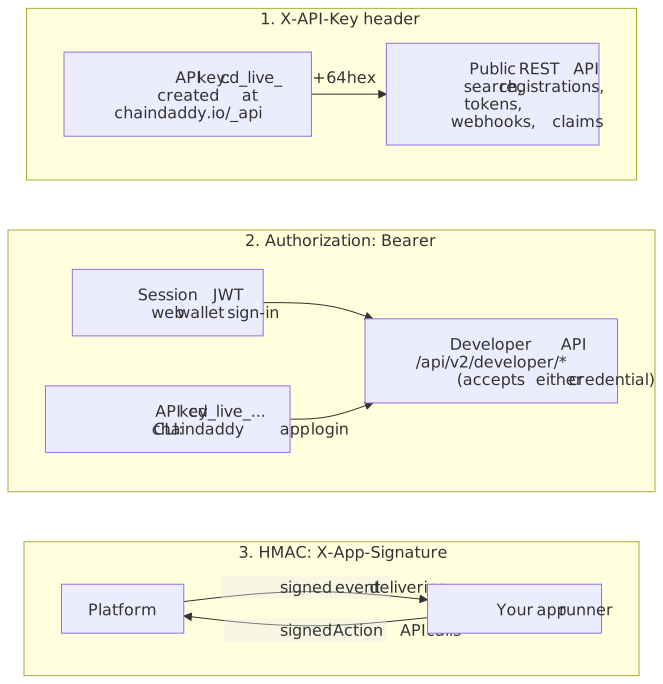
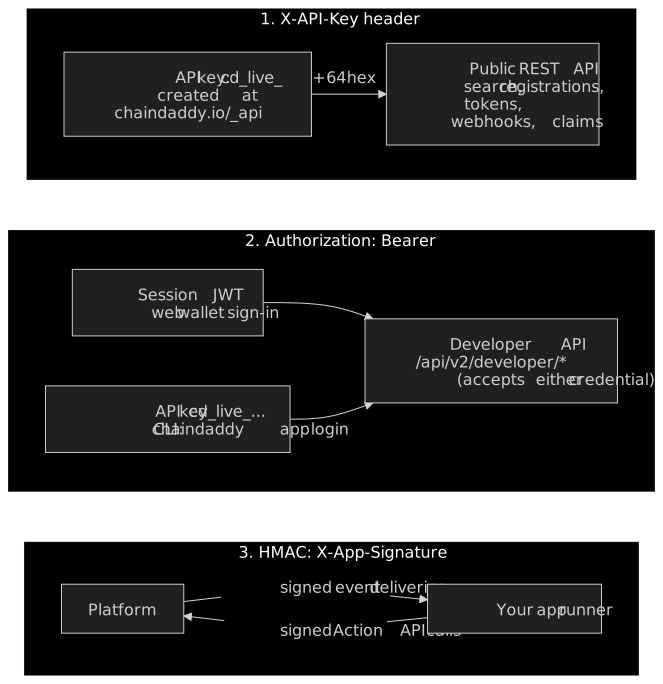
The developer endpoints (/api/v2/developer/*) take a session token or your API key as Authorization: Bearer …. Traffic between the platform and an app's own server is HMAC-signed: see Security & Auth. A creator store has its own cd_iap_ keys: see Store and Rewards.